
Most small businesses using Employment Hero already have an onboarding checklist. Fewer have automated it. Employment Hero workflows are what turn a checklist into a process that runs itself: when a new starter is added, the right documents, tasks and reminders go to the right people without anyone having to remember. Here are five onboarding workflows worth setting up first.
Short answer: the five onboarding workflows every small business should automate in Employment Hero are: the right documents for each employment type, policy assignment and acknowledgement, manager and IT tasks before day one, licences and certifications by role, and probation review reminders. Start with Employment Hero’s pre-built templates, test each workflow with a test employee, and give every task a named owner.
How Employment Hero workflows work
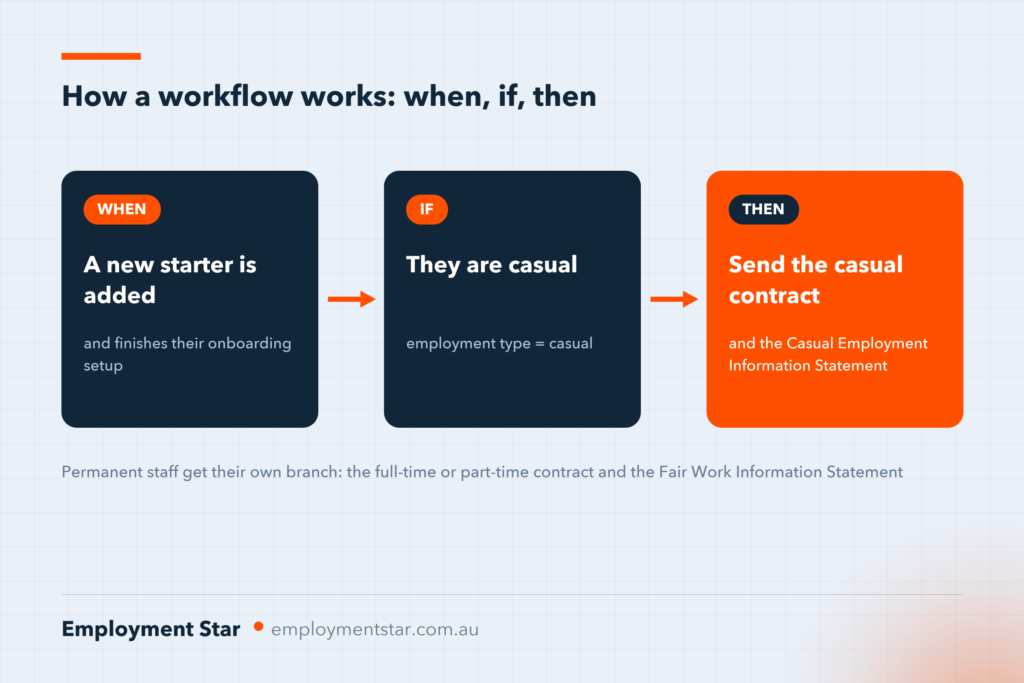
Employment Hero workflows follow a “when, if, then” pattern:
- When something happens, such as a new employee finishing their onboarding setup
- If they meet a condition, such as employment type, job title, start date or cost centre
- Then Employment Hero takes an action, such as starting a checklist, assigning policies or certifications, creating a task with an owner and due date, booking a one-on-one meeting, adding the employee to a probation review, or creating their Microsoft 365 or Google Workspace account
Employment Hero includes pre-built workflow templates, so you do not have to start from scratch. Employment Hero workflows are available on some plans and not others, so check yours before you plan your setup.
If you want to know what to collect from new starters in the first place, read our Employment Hero onboarding checklist. This article is about automating it.
Workflow 1: The right documents for each employment type
When a new employee is added, if they are casual, part-time or full-time, then send the contract and documents for that employment type.
Every new employee must receive the Fair Work Information Statement before, or as soon as possible after, they start. New casual employees must also receive the Casual Employment Information Statement. Build the flow so each employment type gets:
- the right contract template, with the employee’s details filled in automatically
- the Fair Work Information Statement, and for casuals the Casual Employment Information Statement
- the tax file number declaration and super choice form
Why it matters: sending the wrong contract to a casual, or forgetting the information statements, is one of the easiest compliance mistakes to make by hand. A workflow makes it the same every time. Our guide to Employment Hero contracts explains what each contract type should include.
Workflow 2: Policies assigned and acknowledged
When onboarding is complete, if the employee works in a particular role or location, then assign the policies that apply to them, with a due date for acknowledgement.
A policy sitting in a shared folder has not been acknowledged. Assigning it in Employment Hero, with tracked acknowledgement and reminders, is what lets you rely on it later. Assign the core policies to everyone, such as the code of conduct, workplace health and safety, and bullying and harassment, then add role-specific policies through conditions. Employment Hero’s pre-built “assign policies after onboarding” template is a good first workflow to switch on.
Workflow 3: Manager and IT tasks before day one

When a new starter’s start date is set, then create tasks for the people who need to get ready, each with an owner and a due date before day one:
- the manager: plan the first week and book a one-on-one meeting
- IT or the office manager: laptop, phone, access cards, email and system accounts
- the roster manager: add the new starter to the roster
- a buddy, if you use one: an introduction on the first morning
If you use Microsoft 365 or Google Workspace, a workflow can create the new starter’s account automatically.
Why it matters: the paperwork can be perfect and the first day can still go badly if nobody set up a login. Tasks with owners and due dates stop that happening.
Workflow 4: Licences and certifications by role
When a new employee is added, if their job title requires a licence or check, then assign the certification and ask for proof before the first shift.
Common examples are a Working with Children Check for care and education roles, a Responsible Service of Alcohol certificate for hospitality, a construction induction (white card) for building sites, and forklift licences in warehouses. Set the requirement against the role, not the person. When you hire the next person into that role, the requirement is attached automatically, and Employment Hero can track expiry dates.
Workflow 5: Probation review reminders
When an employee starts, if their contract includes probation, then add them to a probation review and send the manager reminders before probation ends.
Probation reviews are easy to forget until the date has passed. A workflow books the check-ins in advance, such as at one month, at three months, and two weeks before the end of probation, so the manager has time to give feedback, extend probation if the contract allows it, or confirm employment.
Keep in mind that probation in a contract is separate from the minimum employment period for unfair dismissal claims, which is 6 months, or 12 months for a small business employer. Our probationary period guide explains how the two fit together.
One more step: the handover to payroll
When onboarding is complete, the new starter’s personal, bank, tax and super details should flow into payroll without anyone re-keying them. Check this works before the first pay run. Under Payday Super, the first contribution for a new employee has up to 20 business days to reach their fund, and after that the usual 7 business days apply. If a new starter has not chosen a fund, request their stapled fund details from the ATO straight away.
How to set up Employment Hero workflows without the headaches
- Start with a pre-built template and change it, rather than building from scratch.
- Test every workflow with a test employee before it runs on real people.
- Give every task a named owner, not a team.
- Use conditions sparingly. Five clear workflows are easier to maintain than twenty overlapping ones.
- Review them every quarter, and whenever you add a role, a site or a new award.
Common Employment Hero workflows mistakes
- Everything sent on day one, so nothing is read properly. Spread documents and training across the first fortnight.
- Workflows that trigger on the wrong event, such as when a profile is created instead of when onboarding is complete.
- No workflow for casuals, who need different documents.
- Expecting onboarding workflows to cover contractors. Onboarding workflows apply to employees, so contractor tasks need to be set up another way.
Want your onboarding running on autopilot?
Employment Star sets up onboarding and offboarding workflows, contracts and policies as part of our Employment Hero HR setup, from $2,340 ex-GST and live in as little as 14 business days. Prefer to build them yourself? Book Employment Hero training from $195 per hour ex-GST. Call 02 7803 7879.
Frequently asked questions
How do onboarding workflows work in Employment Hero?
Employment Hero workflows automate HR processes using “when, if, then” rules. When something happens, such as a new starter completing onboarding, and a condition is met, such as their job title or employment type, Employment Hero takes an action, such as assigning policies or creating tasks.
Are Employment Hero workflows included in every plan?
No. Workflows are available on some Employment Hero plans and not others. Check your plan, or ask us, before you plan your setup.
Can I run different onboarding workflows for casual and permanent staff?
Yes. Use employment type as a condition, so casuals receive the casual contract and the Casual Employment Information Statement, and permanent staff receive their own documents.
Do onboarding workflows work for contractors?
Onboarding workflows apply to employees. For contractors, use other workflow types or assign tasks manually after the contractor is added.
How long does it take to set up onboarding workflows?
Simple workflows built from templates can be set up and tested in a day or two. As part of a full Employment Hero HR setup with Employment Star, a standard implementation is live in 14 business days.
This article is general information only. Check your obligations with the Fair Work Ombudsman or a qualified adviser.
About Employment Star — We are a certified Employment Hero implementation partner based in Parramatta, NSW, working with small and medium businesses across Australia. We provide Employment Hero HR and payroll setup, HR consulting and training, outsourced HR and outsourced payroll.
Published 24 November 2026 · Last updated 24 November 2026